
What the SketchUp 2026 download includes
SketchUp 2026 is the current major desktop release identified on SketchUp's official download page. The Windows and macOS links above point to SketchUp's own download domain rather than a third-party mirror. The Windows online installer is the normal choice for an individual computer, while the full offline package is intended for situations where installation resources need to be available without repeated network downloads.
Downloading the installer does not create a permanent free SketchUp Pro license. Desktop access depends on the subscription, trial or education entitlement associated with your Trimble account. If you only need personal browser modeling, SketchUp Free for Web may be a better fit because it does not require a desktop installer.
Check compatibility before installing SketchUp 2026
A successful SketchUp 2026 installation starts with a supported operating system and graphics environment. SketchUp is a real-time 3D application, so a current graphics driver and hardware acceleration matter more than they do for a basic office application. Review the official system-requirements page before downloading when the computer is older, centrally managed or relies on integrated graphics.
Teams should also check extension compatibility before upgrading production machines. An extension that worked in SketchUp 2024 or 2025 may require an update for the 2026 Ruby API or changed scene behavior. Keep the previous supported release available until critical plugins, templates, renderers and import/export workflows have been tested with a copy of a real project.
- Use a supported 64-bit Windows release or a currently supported macOS version.
- Install current graphics drivers from the computer or GPU manufacturer.
- Confirm that rendering extensions such as Enscape or V-Ray support SketchUp 2026.
- Back up custom templates, materials, shortcuts and extension settings before migration.
How to install the SketchUp 2026 download
On Windows, save the EXE file, close other applications, then run the installer with the permissions required by your organization. The online installer can obtain Microsoft runtime components and other required files during setup. If an administrator needs one package for multiple machines or an unreliable network, use the full offline installer instead. Do not interrupt the process while language resources or prerequisites are being installed.
On macOS, open the DMG package and follow the included application installation flow. If macOS blocks the package, confirm that it came from download.sketchup.com and use the normal Security & Privacy controls rather than downloading a repacked copy elsewhere. After installation, sign in with the Trimble ID connected to your plan or trial and open a small model to verify graphics, fonts and file access.
- Download only from the verified SketchUp-hosted URL.
- Allow the operating system to complete its normal signature and permission checks.
- Launch the application once before copying extensions from an older installation.
- Test saving, reopening and exporting a copy of a model before production use.
What changed in SketchUp 2026
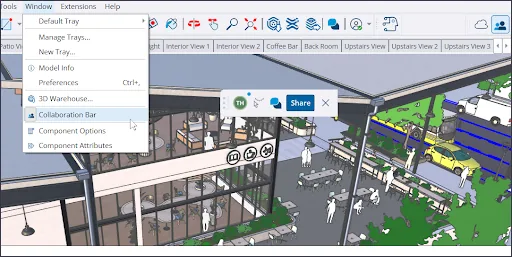
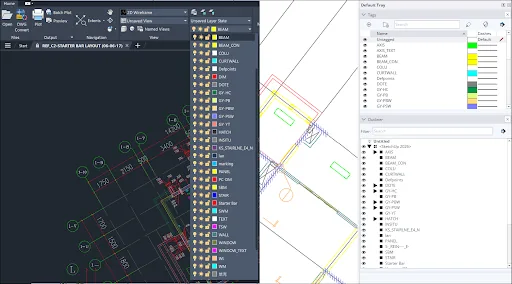
The official 2026 release notes describe changes across collaboration, visualization, Live Components, import/export and developer APIs. Collaboration controls are more visible in the desktop workspace, ambient-occlusion controls have changed, and multiple DWG, IFC, 3DS, USDZ and TrimBIM issues were addressed. The exact benefit depends on whether your work centers on conceptual modeling, documentation, coordination or file exchange.
Extension developers should pay particular attention to the 2026 API notes. Scene operations are now undoable, and extensions that modify scenes are expected to wrap those changes in proper operations. Users do not need to edit code, but this change explains why testing extension updates is important before a company-wide migration. Always read the current release notes for maintenance updates beyond the original 2026.0 release.
- Updated collaboration and commenting surfaces.
- Changes to ambient occlusion and visual presentation controls.
- Import/export fixes for common architecture and interoperability formats.
- Ruby and C API changes that may affect older extensions.

Verify the SketchUp 2026 download before opening it
A browser download should show the same first-party host used on SketchUp Help: download.sketchup.com. The current Windows online installer is approximately 1.09 GB, the macOS DMG is approximately 1.49 GB, and the full Windows offline installer is approximately 1.95 GB based on the CDN response checked on July 16, 2026. A materially different host, unexpected archive password or tiny executable is a reason to stop and return to the official page.
Keep the original installer filename visible in the Downloads folder and allow Windows or macOS to perform its normal publisher and security checks. File size can change when SketchUp publishes a maintenance build, so use it as supporting evidence rather than a permanent checksum. If the official page points to a newer build, prefer that new SketchUp 2026 download and update deployment records before installing it across a team.
- Confirm the final host is download.sketchup.com.
- Compare the platform, build number and approximate file size.
- Reject password-protected archives, patchers and bundled download managers.
- Recheck SketchUp Help when the installer filename or build changes.
SketchUp 2026 installer comparison
Choose an installer based on platform and deployment needs, not on claims from an unofficial mirror.
| Installer | Platform | Best use | Network requirement |
|---|---|---|---|
| Windows online | Windows 64-bit | Normal individual installation | Downloads required components during setup |
| Windows offline | Windows 64-bit | Managed deployment or limited connectivity | Larger package prepared for offline use |
| macOS DMG | macOS | Normal Mac installation | Internet still needed for account sign-in and updates |
SketchUp 2026 download FAQ
Is SketchUp 2026 the latest version?
Yes. SketchUp's official download page identified SketchUp 2026 as the latest major release when checked on July 16, 2026.
Is the SketchUp 2026 download free?
The installer can be downloaded, but continued desktop Pro use requires an eligible subscription, trial or education entitlement. SketchUp Free for Web is a separate browser product.
Which SketchUp 2026 Windows installer should I use?
Most individual users should choose the standard Windows installer. Use the full offline installer for managed deployment, extra language resources or unreliable internet access.
Can SketchUp 2026 open older SKP files?
SketchUp generally supports opening older SketchUp model files, but you should test important projects and keep backups before saving them in a newer format.
Will my old plugins work in SketchUp 2026?
Some will, but compatibility depends on the developer and API usage. Check the extension's original listing and install its current version rather than copying an old plugin folder blindly.
Does this page provide a SketchUp 2026 crack?
No. This site does not host cracks, activation bypasses or modified installers. Download links point to the official SketchUp distribution domain.
Official sources checked
We verify download and support details against first-party SketchUp and Trimble pages. External sources open in a new tab.
- Downloading SketchUp — current version and direct installer links
- SketchUp Desktop 2026.0 release notes — feature, fix and API details
- SketchUp system requirements — official hardware and operating-system guidance