
2026CURRENT
SketchUp 2026 download
The latest desktop release with current fixes, collaboration changes, updated import/export behavior and support coverage.
View 2026 detailsGet the current SketchUp download from verified first-party links. Choose the Windows online installer, the macOS installer, or the full Windows offline installer, then use our version and installation notes to avoid outdated or unauthorized packages.
SketchUp officially supports the current major release and the previous two major releases. As of July 2026, that means SketchUp 2026, 2025 and 2024. Older pages can still explain compatibility, but they should not be presented as supported software.
The latest desktop release with current fixes, collaboration changes, updated import/export behavior and support coverage.
View 2026 detailsA supported older release for teams that need compatibility with a 2025 extension, workflow or project environment.
View 2025 downloadsThe oldest desktop release currently listed as supported by SketchUp, with official Windows and Mac installers.
View 2024 downloadsThe word free can describe several different products. SketchUp for Web has a free browser option for personal projects, while the desktop Pro product is commercial software with a trial. SketchUp Make 2017 was a free desktop release, but it is no longer distributed or supported by SketchUp.
| Option | Best for | Download required | Important note |
|---|---|---|---|
| SketchUp 2026 Desktop | Professional desktop modeling | Yes | Current release; subscription or trial terms apply |
| SketchUp Free for Web | Personal browser-based modeling | No | Runs at app.sketchup.com with a Trimble ID |
| SketchUp Pro trial | Evaluating desktop features | Yes | Use the official trial flow; it is not a permanent free Pro license |
| SketchUp Make 2017 | Legacy reference only | Previously | No longer offered by SketchUp and built for obsolete operating systems |
A clean SketchUp installation starts with the correct platform and an official installer. These steps cover the normal desktop workflow without activation bypasses, unofficial patchers or repacked archives.
Use the Windows installer only on a supported 64-bit Windows system. Use the DMG package on a compatible Mac. Check SketchUp system requirements before downloading if the computer is older or uses managed graphics hardware.
The standard Windows installer can obtain required components during setup. The larger offline installer includes available language resources and is useful for managed deployment or an unreliable connection.
Our download buttons use a 15-second confirmation screen and then open download.sketchup.com. Check the browser address before saving the file, especially if another page promised a crack or modified build.
Close other applications, open the downloaded installer, approve the normal operating-system prompt and follow the installation wizard. Windows may also install required Microsoft runtime components.
Launch SketchUp, sign in with the Trimble account associated with your subscription or trial, and open a small test model before migrating extensions and production files.
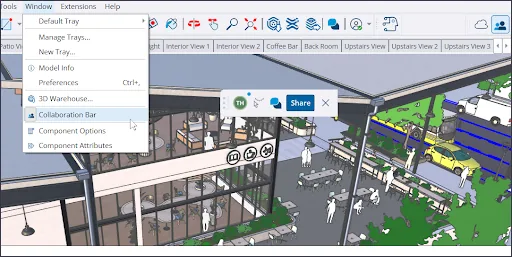

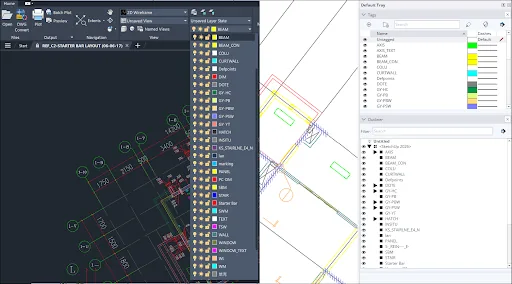
After the desktop application is installed, most users need one of three things: a legitimate extension, a reusable 3D model, or a clear answer about free and Pro licensing. These focused pages keep those intents separate so you can reach the right official source quickly.
Compare the free Web modeler, the official Pro trial and education access without confusing them with cracked desktop packages.
Compare free optionsReview the official Pro trial flow, desktop installer choices, account requirements and what happens after the trial.
Open the Pro guideFind extensions through Extension Warehouse and original developer sources, with compatibility and license checks before installation.
Browse plugin guidanceOpen the official model library, understand sign-in and usage rights, and download components in a version your SketchUp release can open.
Use 3D WarehouseSee how the web-and-iPad plan compares with Free and Pro, where it works and which official route to use.
Read the Go guideLearn how browser modeling, files, 3D Warehouse and Web versus desktop choices fit together.
Read the Web guideDownload searches often mix current installers with unsupported builds, repacked archives and pages that use words such as crack, torrent or pre-activated. Those packages cannot be verified against SketchUp's distribution policy and may introduce malware, altered program files, broken updates or license problems.
This SketchUp download guide checks first-party SketchUp Help pages to confirm the current release, support window and direct installer URLs. SketchUp Download Wiki is an independent guide, not an official Trimble property. We do not host SketchUp installers, paid plugins or third-party model libraries. SketchUp and Trimble are trademarks of Trimble Inc.
These answers address the most common differences between SketchUp 2026, free browser access, Pro trials and legacy downloads.
Use the Windows, macOS or Windows offline-installer buttons on this page. They open verified files on download.sketchup.com after a 15-second countdown.
SketchUp offers a free browser-based product for personal use and an official trial for paid desktop products. A SketchUp Pro installer is not the same as a permanent free Pro license. See our SketchUp Free guide.
SketchUp's official download page identified SketchUp 2026 as the latest major version when checked on July 16, 2026. The current installer links on that page use the 2026.2 build.
SketchUp states that it no longer offers SketchUp Make downloads. The product has not been updated since 2017 and was built for operating systems that are also obsolete. Read the Make 2017 status page before using an old copy.
The normal online installer is suitable for most individual installations. The full offline installer is useful when extra language resources, managed deployment or limited internet access makes an all-in-one package preferable.
No. The site provides independent guidance and sends download actions to verified first-party SketchUp URLs. It does not mirror installers, cracks, paid extensions or model files.
No. SketchUp's older-version page says that 2024, 2025 and 2026 are supported and that 2023 and earlier releases are not supported as of July 2026.
READY TO INSTALL
Return to the installer selector, choose Windows or macOS, and confirm that your browser opens download.sketchup.com.